
Compress PDF to 100KB Online Free
Compress PDF to 100KB or any size a website asks for, in one click.
- No upload
- Any size you need
- No sign-up
- Text stays sharp

Compress PDF to 100KB, 200KB, 500KB or 1MB when an exam, job or government portal will not take your file. Pick the size, and the tool makes the PDF smaller step by step until it fits, keeping the text sharp wherever it can. The file never leaves your device.
How to Compress PDF to 100KB
Choose the size first; the tool does the rest.
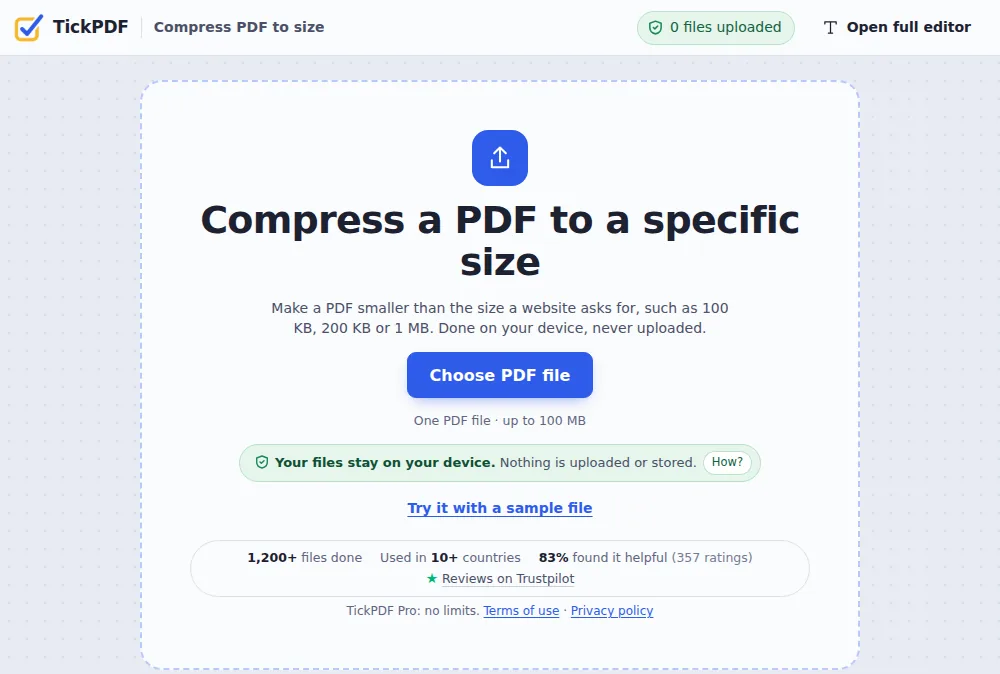
Choose your PDF
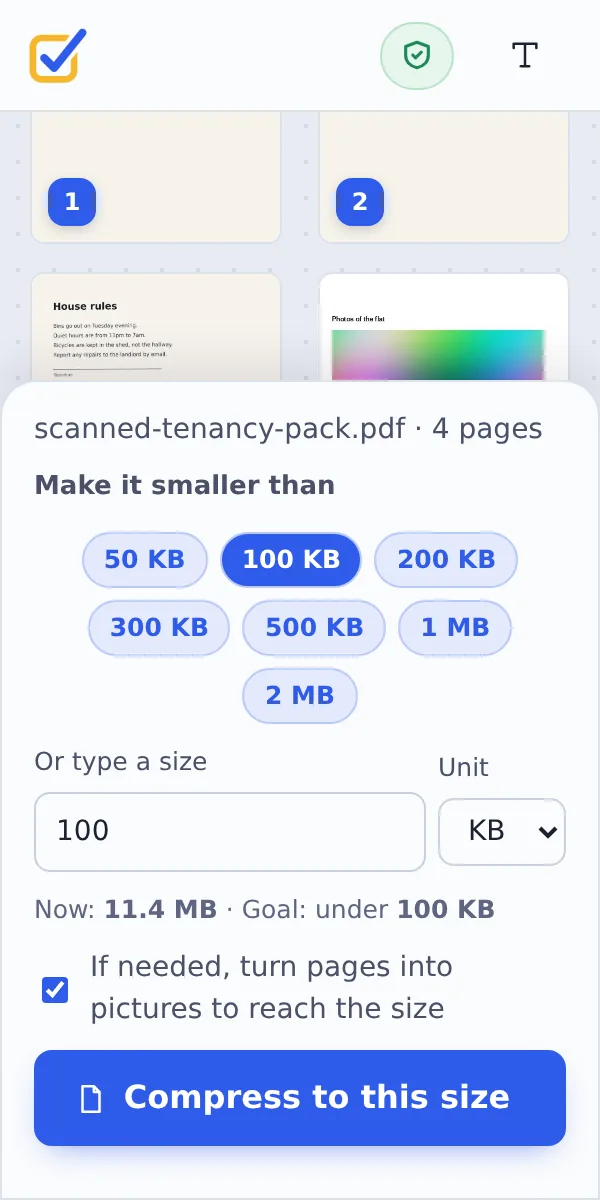
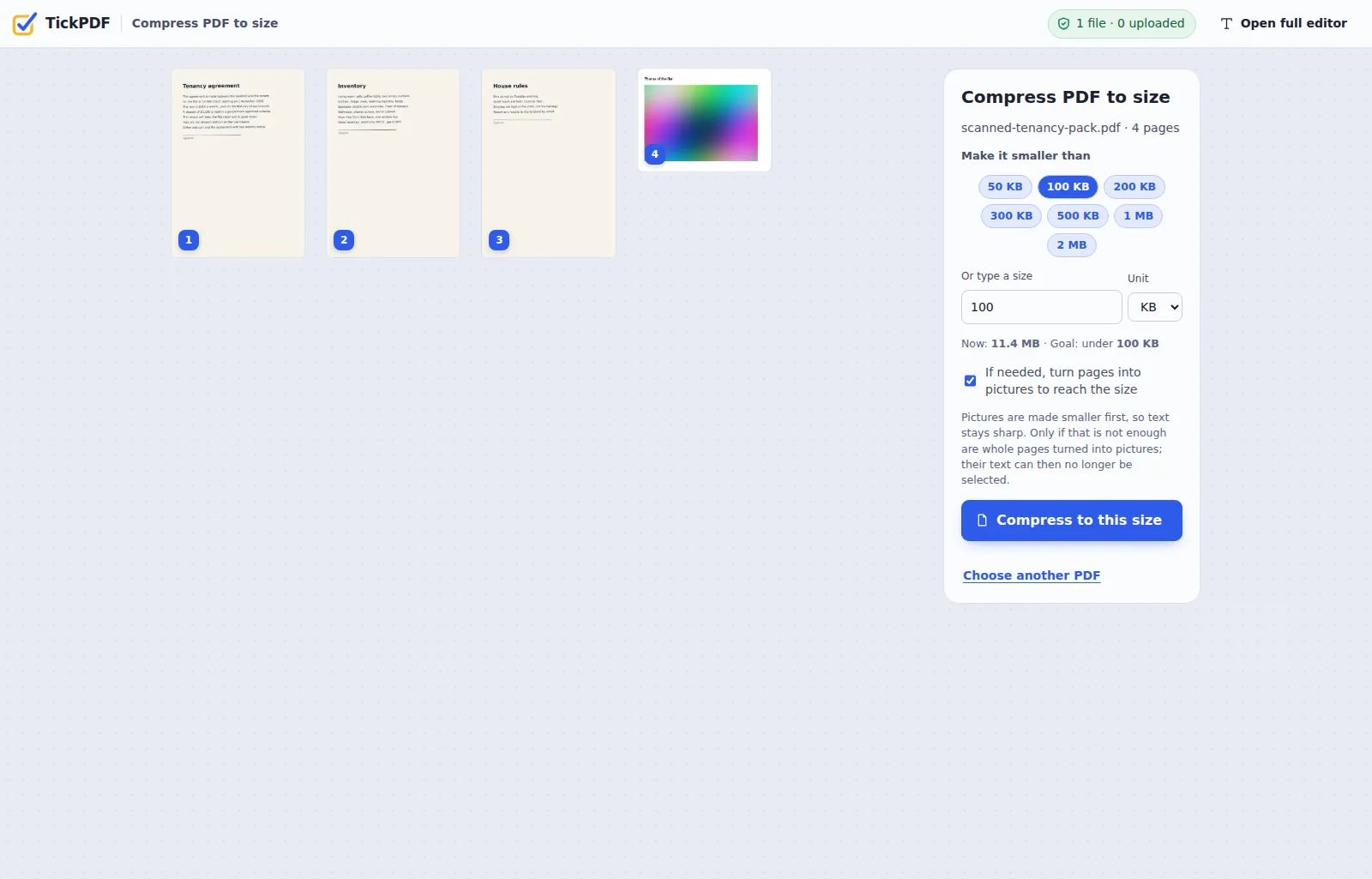
Click Choose PDF file or drop the PDF on the tool above. Its current size is shown.
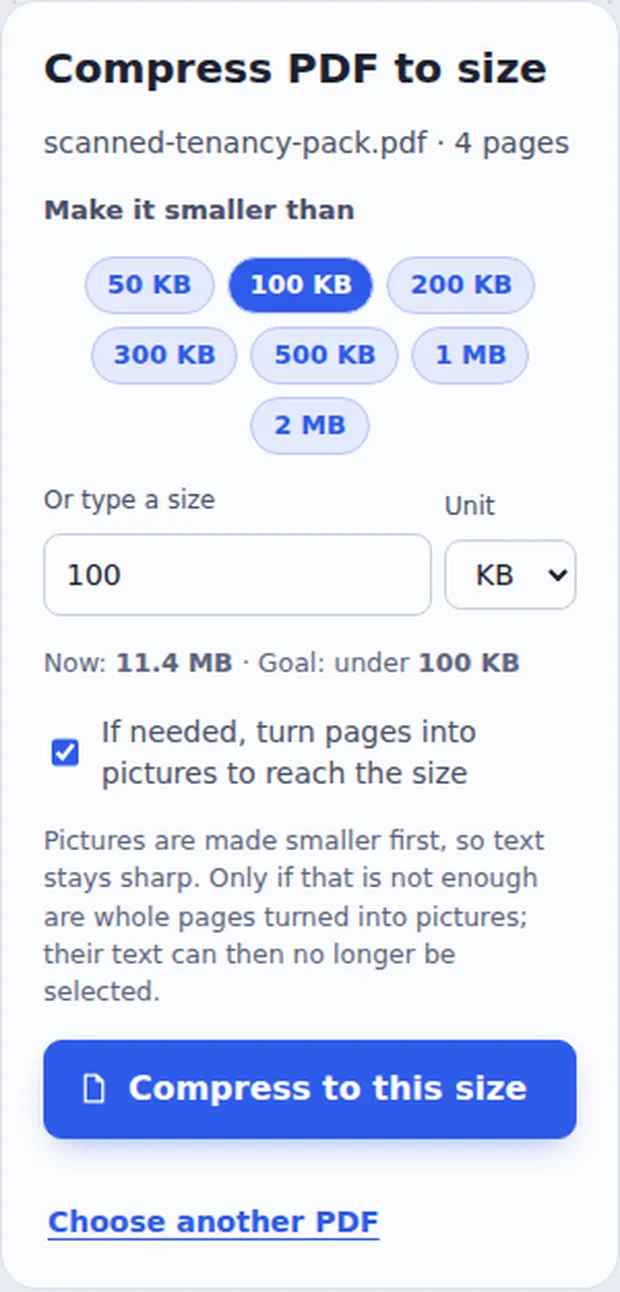
Pick the size
Click 100 KB, 200 KB, 500 KB or 1 MB, or type the exact limit the website gives. Click Compress to this size.
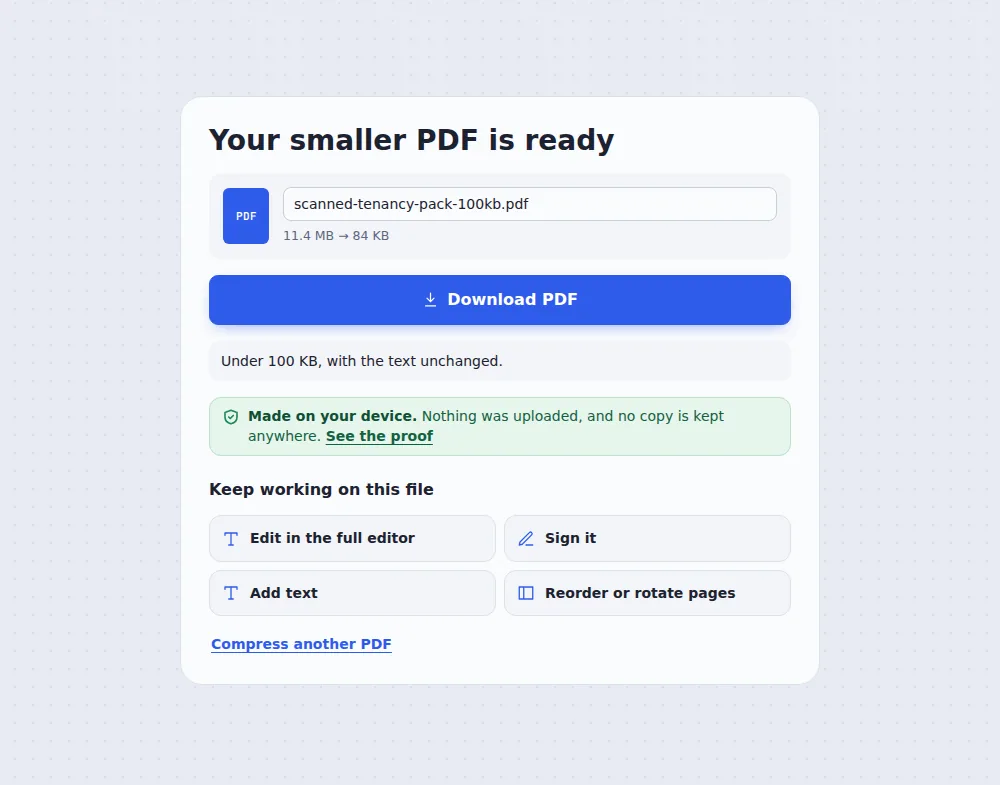
Download the smaller file
Click Download PDF. The new size is shown, so you know it will be accepted.
How a PDF Gets Down to 100KB
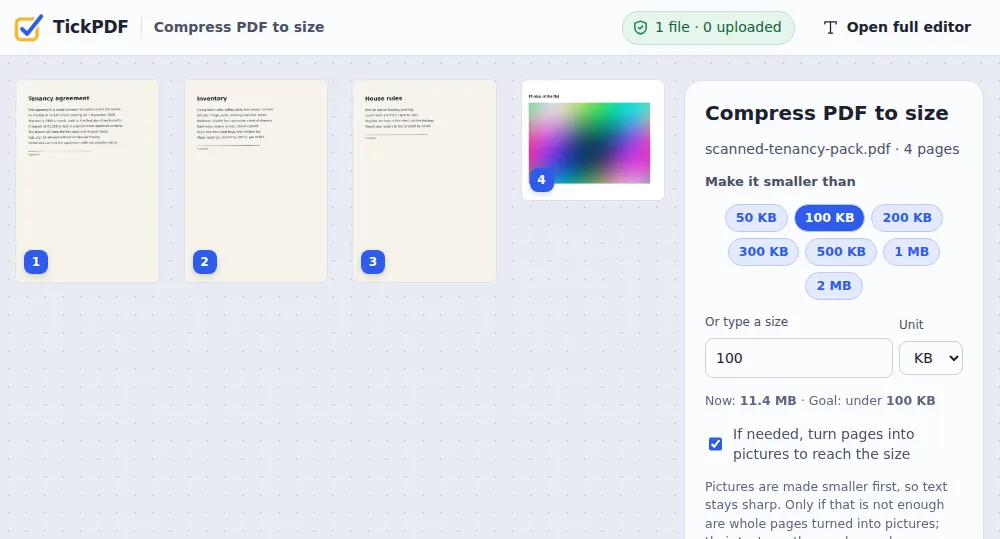
Most of a big PDF is pictures: scanned pages, photos and logos. To compress PDF to 100KB, the tool first makes those pictures smaller, a little at a time, and stops as soon as the file is under your limit. Text and lines are not touched, so they stay sharp.
If that is still not enough, for example with a long scanned document, the pages themselves are turned into lighter pictures. The PDF still looks the same, but its text can no longer be selected. You can switch this off.
If a file cannot reach the size at all, the tool tells you the smallest it could make, instead of pretending.
Pictures first
Scans and photos are made lighter.
Pages if needed
Only when pictures are not enough.
Under the limit
The new size is shown before you upload.
A Scan Too Big for the Portal
A scanned application that a website rejects for being over its limit. Compress PDF to 100KB and it goes through.
Common Upload Limits
Typical limits websites set, and when to compress PDF to 100KB.
| Typical limit | Pick | |
|---|---|---|
| Exam and admission forms | 100 KB to 300 KB | 100 KB or 200 KB |
| Job applications and CVs | 500 KB to 2 MB | 500 KB or 1 MB |
| Government and passport portals | 100 KB to 1 MB | The exact limit shown |
| Email attachments | 10 MB to 25 MB | Compress PDF instead |
Compress PDF to 100KB Without Uploading
Application forms carry your ID numbers and address. TickPDF makes the file smaller inside your own browser tab, so it never leaves your device.
There is no account and no copy on our side.
- 0files uploadedYour PDF stays on your device.
- 0copies keptWe never see your pages.
- 0accounts neededOpen the page and start.
Works on iPhone, Android or Computer
- Windows
- Mac
- Linux
- Chromebook
- iPhone
- iPad
- Android
To compress PDF to 100KB on a phone, open this page in the browser, choose the PDF, tap 100 KB and then Compress to this size.
It works the same on Windows, Mac, Linux and Chromebook, with nothing to install.
When People Compress PDF to 100KB
Size limits show up whenever a form has to be uploaded, so people compress PDF to 100KB all the time.
Exam forms
Certificates and photos under the limit.
Job portals
CVs and documents that upload first time.
Government sites
Passport, tax and ID applications.
Bank and loan forms
Supporting documents that fit.
Visa applications
Every page under the cap.
School portals
Assignments under the size limit.
Tips to Compress PDF to 100KB
- Fewer pagesDelete pages the form does not need.
- Black and whiteGrey scans are much lighter.
- Split itUpload long files in parts.
- Check itOpen the result before you upload.
- Not that strict?Use Compress PDF for normal sizes.
- Keep the originalYour original PDF is not changed.
More PDF Tools
They all run in the same private editor.
Compress PDF
Make the file smaller.
Split by size
Files under an email limit.
Black and white PDF
Grey or pure black and white.
Delete PDF pages
Remove pages you do not need.
Scan to PDF
Phone photos to a clean PDF.
PDF Editor
Edit text, sign and annotate.
Compress PDF to 100KB: Frequently Asked Questions
Answers to what people ask before they make a PDF smaller.
How do I compress a PDF to 100KB?
Choose your PDF at the top of this page, click 100 KB and then Compress to this size. The pictures in the file are made smaller step by step until it is under 100 KB, then you download it.
Can I compress a PDF to 200KB, 500KB or 1MB?
Yes. Click 200 KB, 500 KB, 1 MB or 2 MB, or type the exact limit a website gives, in KB or MB.
Can I compress a PDF to 100KB for free?
Yes. The free plan works on PDFs up to 50 pages and 20 MB, with 3 downloads a day, no account and no watermark. TickPDF Pro removes these limits.
How do I compress a PDF to 100KB on my phone?
Open this page in your phone's browser, choose the PDF, tap 100 KB and then Compress to this size. There is no app to install.
Will my PDF still be readable at 100KB?
For one or two pages, yes: pictures are made lighter while the text stays sharp. Long scanned documents may need their pages turned into lighter pictures to fit, which keeps them readable but makes the text unselectable. Check the result before you upload it.
Why could my PDF not get under the size?
Some files have too many pages, or too much detail, for a very small limit. The tool then gives you the smallest file it can make and says so. Remove pages the form does not need, convert to black and white, or split the PDF, and try again.
Is it safe to compress a PDF online?
Yes. Your PDF is not uploaded. It is opened and processed inside your browser tab and never sent to our servers, so nobody else sees it. Close the tab and nothing is left behind.
What is the difference from Compress PDF?
Compress PDF makes a file as small as it can at the quality you choose. This tool aims at a size: it stops as soon as the file is under your limit, so it keeps as much quality as the limit allows.
All PDF Tools (102)
Every TickPDF tool in one place. They run in your browser, so your files are never uploaded.
Most used
Edit 15
Annotate 12
Fill & Sign 8
Organize 22
Convert to PDF 16
Convert from PDF 9
Optimize & Protect 20
No tool matches that. Try another word, or open the PDF editor: it does most jobs in one place.
Online PDF EditorPricingPDF Editor No WatermarkPrivate PDF EditorPDF Editor for MacPDF Editor for WindowsPDF Editor for iPhonePDF Editor for AndroidPDF Editor for Chromebook
Ready to Compress PDF to 100KB?
No account, no upload and no watermark: choose your PDF at the top of this page.
Open the toolTickPDF shrinks the file on your own device. Choose your file and compress PDF to 100KB today.