
Bates Numbering PDF Online Free
Bates numbering PDF pages: a unique number on every page, in seconds.
- No upload
- Live preview
- No sign-up
- Continue across files

Bates numbering PDF documents gives every page a unique, sequential identifier such as ABC000001, so lawyers, courts and auditors can refer to any page without confusion. Set the prefix, the first number and the position, check the preview and download. The documents are never uploaded.
How to Add Bates Numbers to a PDF
The preview shows the number on each page.
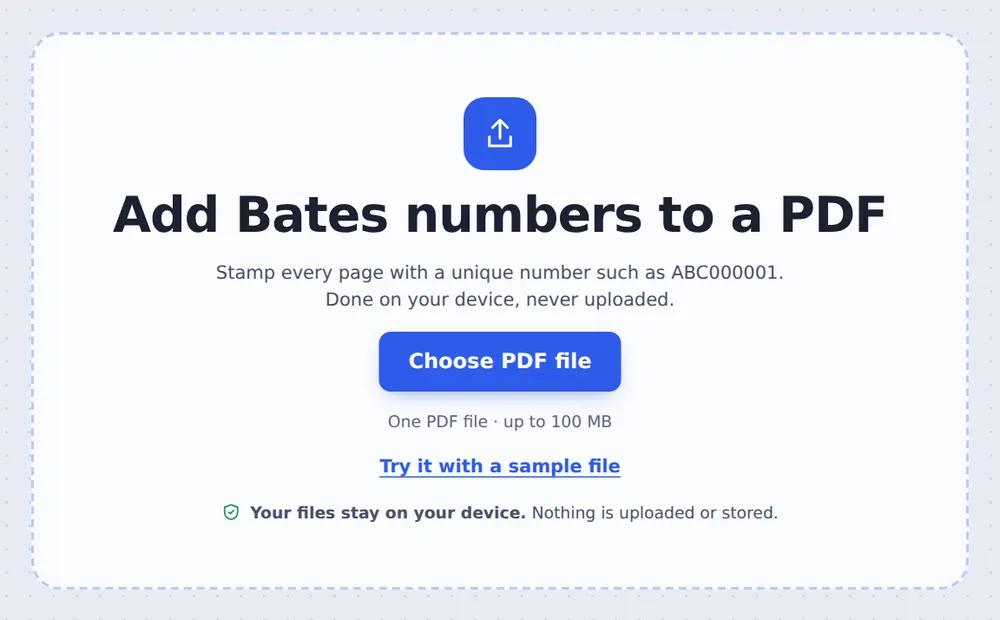
Choose your PDF
Click Choose PDF file or drop the PDF on the tool above. Every page is selected.
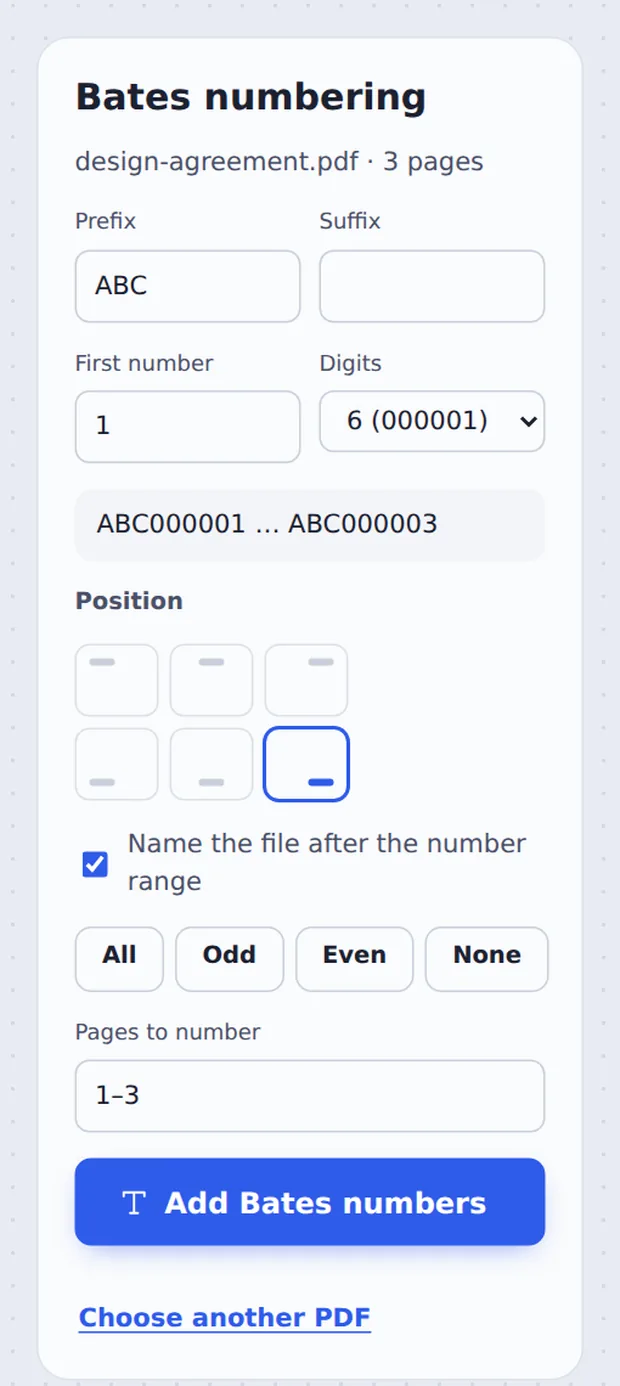
Set the format
Type the Prefix, First number and Suffix, pick the Digits and the corner. Click Add Bates numbers.

Download the numbered file
The file is named after its range, such as ABC000001-ABC000045.pdf, and the screen tells you the next number to use.
What Is Bates Numbering?
Bates numbering is the legal world's way of labelling pages. Every page in a case or audit gets its own number, usually a short prefix for the party or matter followed by a number with leading zeros: ABC000001, ABC000002 and so on.
Unlike ordinary page numbers, Bates numbers never restart. When a set of documents is produced, the numbers continue from one file to the next, so each page has an identifier that is unique across everything.
This tool adds the number as real text, so it is searchable, prints clearly and cannot be lost like a sticky label.
Prefix + number
Such as SMITH-000123.
Never restarts
Continue from the last number.
Searchable
Real text on every page.
Check the Numbers Before You Download
Every selected page shows its Bates number in the corner you chose.

Common Bates Formats
Pick what your court, firm or client asks for.
| Example | Settings | |
|---|---|---|
| Party prefix | ABC000001 | Prefix ABC, 6 digits |
| Matter and dash | SMITH-0001 | Prefix SMITH-, 4 digits |
| With suffix | DEF00000001-C | Prefix DEF, 8 digits, suffix -C |
| Continuing | ABC000046 | First number 46 |
A Clear Number on Every Page
Black text in the corner, kept clear of the page edge.

Bates Numbering PDF Files Without Uploading
Documents in a legal matter are confidential. TickPDF adds the numbers inside your own browser tab, so the files never leave your device.
There is no account and no copy on our side.
- 0files uploadedYour PDF stays on your device.
- 0copies keptWe never see your pages.
- 0accounts neededOpen the page and start.

Works on iPhone, Android or Computer
- Windows
- Mac
- Linux
- Chromebook
- iPhone
- iPad
- Android
Open this page in your phone's browser, choose the PDF, set the prefix and tap Add Bates numbers.
It works the same on Windows, Mac, Linux and Chromebook, with nothing to install.
Who Uses Bates Numbers
Bates numbering PDF files is standard wherever pages must be referenced exactly.
Law firms
Discovery and document production.
Courts
Exhibits and trial bundles.
Auditors
Evidence and working papers.
Medical records
Records produced for claims.
HR investigations
Interview notes and emails.
Compliance
Regulatory submissions.
Tips for Bates Stamping
- Continue the rangeType the next number shown after each file.
- Or merge firstJoin the files and number them all at once.
- Mind existing footersChoose a corner that is empty on every page.
- Name by rangeKeep Name the file after the number range ticked.
- Redact beforeRedact privileged text before numbering.
- Keep the originalYour original PDF is not changed.
More PDF Tools
They all run in the same private editor.
Add page numbers
Number the pages.
Merge PDF
Join files into one document.
Redact PDF
Black out private details for good.
Watermark PDF
Mark pages CONFIDENTIAL.
Header and footer
Add a title and page numbers.
Split PDF
Cut a PDF wherever you want.

Bates Numbering PDF: Frequently Asked Questions
Answers to what people ask about Bates stamps.
How do I add Bates numbers to a PDF?
Choose your PDF at the top of this page, type a prefix such as ABC, the first number and how many digits to use, pick the corner, and click Add Bates numbers.
Can I add Bates numbers to a PDF for free?
Yes. The free plan works on PDFs up to 50 pages and 20 MB, with 3 downloads a day, no account and no watermark. TickPDF Pro removes these limits.
Can I add Bates numbers to a PDF online?
Yes. The tool runs in your web browser on Windows, Mac, Linux and Chromebook, with nothing to install. Open your PDF at the top of this page to start.
How do I add Bates numbers to a PDF on my phone?
Open this page in your phone's browser, choose the PDF, set the prefix and tap Add Bates numbers. There is no app to install.
Can I add Bates numbers to a PDF without Adobe Acrobat?
Yes. You do not need Acrobat or any other software. The tool runs in your browser, and the new PDF opens in Acrobat, Preview, Chrome and every other PDF reader.
Is it safe to add Bates numbers to a PDF online?
Yes. Your PDF is not uploaded. It is opened and processed inside your browser tab and never sent to our servers, so nobody else sees it. Close the tab and nothing is left behind.
How do I continue Bates numbers across several PDFs?
The finished screen tells you the next number to use. Open the next PDF and type that number in First number. Or merge the files first and number them all at once.
What is the easiest way to add Bates numbers to a PDF?
Open the PDF above and click Add Bates numbers. The default ABC000001 in the bottom right corner is ready to use, and the file is named after the number range.
Ready to Add Bates Numbers?
No account, no upload and no watermark: choose your PDF at the top of this page.
Open the toolTickPDF stamps every page on your own device. Choose your file and start Bates numbering PDF documents today.