Annotate PDF Online Free
Annotate PDF pages with highlights, drawings and notes.
- No upload
- No watermark
- No sign-up
- Snaps to words

Annotate PDF notes, articles and contracts the way you would on paper, but neater. Highlight and underline text, strike out words, draw freehand, add arrows, boxes and comment notes, then download. Everything happens in your browser, with no upload and no watermark.
How to Annotate PDF Pages
The highlighter is ready when the PDF opens.

Open your PDF
Click Open PDF or drop the file on the editor above.
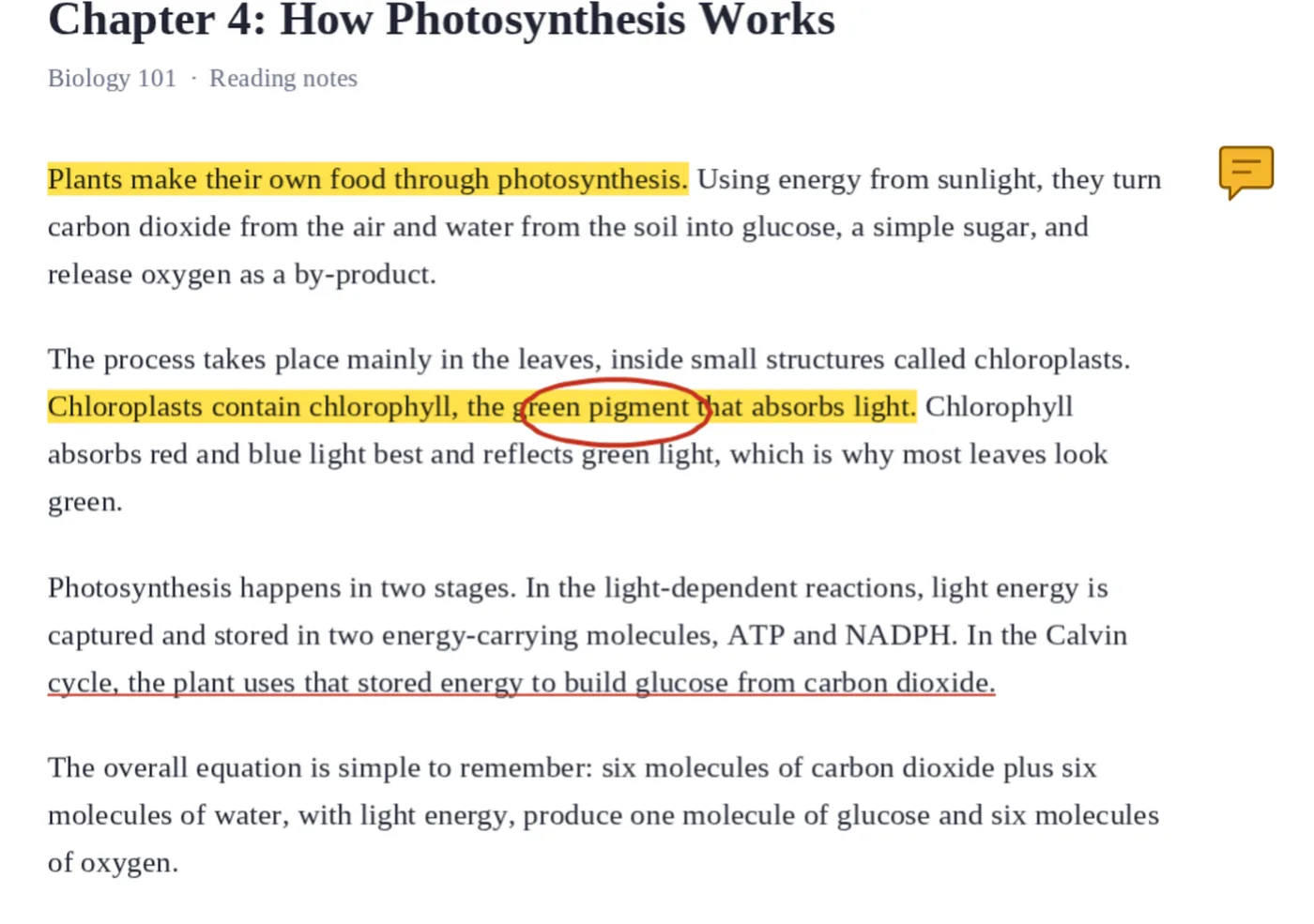
Mark it up
Drag across text to highlight it. Use the Highlight menu to underline or strike out, Draw for freehand and Symbols → Comment note for notes.

Download
Click Download to save the annotated PDF.
Every Annotation Tool in One Place
Studying, reviewing or checking a document usually needs more than one kind of mark: a highlight for key lines, a strikeout for a mistake, a circle round a figure and a note to explain why.
When you annotate PDF pages here, all of those tools are in the toolbar above the page. Highlights snap neatly to whole words, drawings follow your mouse, pen or finger, and comment notes are saved as real PDF comments.
Every mark can be moved, recoloured or deleted until you download, and the original text underneath is never changed.
Text marks
Highlight, underline, strike out.
Drawing
Freehand, shapes and arrows.
Notes
Comments that open in any reader.
Choosing the Right Annotation
Each mark says something different.
| Use it to | Tool | |
|---|---|---|
| Highlight | Point out key lines | Highlight |
| Underline | Mark terms or quotes | Highlight → Underline |
| Strike out | Show text to delete | Highlight → Strike out |
| Circle or arrow | Point at a figure or word | Draw or Shapes |
| Comment | Explain or ask a question | Symbols → Comment note |
Annotate PDF Files Without Uploading
Lecture notes, contracts and reports stay private. TickPDF adds your marks inside your own browser tab, so the file never leaves your device.
There is no account and no copy on our side.
- 0files uploadedYour PDF stays on your device.
- 0copies keptWe never see your pages.
- 0accounts neededOpen the page and start.

Works on iPhone, Android or Computer
- Windows
- Mac
- Linux
- Chromebook
- iPhone
- iPad
- Android
Open this page in your phone's browser or on an iPad, choose the PDF and drag a finger across text to highlight it. Tap Draw to write by hand.
It works the same on Windows, Mac, Linux and Chromebook, with nothing to install.
Who Annotates Documents
People annotate PDF files to study, review and explain.
Students
Revision notes and reading lists.
Teachers
Marking and feedback.
Lawyers
Key clauses and questions.
Designers
Changes on a proof.
Engineers
Notes on drawings.
Book clubs
Favourite passages.
Pro Tips for Faster Results
- Colour codeOne colour per topic or person.
- Zoom inFor neat drawing and small text.
- UndoCtrl+Z removes the last mark.
- Use a penA stylus works well on tablets.
- Add a noteExplain why a line matters.
- Lock it inFlatten PDF makes marks permanent.
More PDF Tools
They all run in the same private editor.
Add comments
Leave notes for others.
Highlight PDF
Mark important lines.
Draw on PDF
Freehand pen and shapes.
Sign PDF
Sign the document.
Flatten PDF
Lock forms and comments in place.
PDF Editor
Edit text, sign and annotate.

Annotate PDF: Frequently Asked Questions
Answers to what people ask before they annotate a PDF.
How do I annotate a PDF?
Open your PDF at the top of this page. Drag across text to highlight it, or choose Underline or Strike out from the Highlight menu. Use Draw for freehand marks and Symbols for comment notes, then click Download.
Can I annotate a PDF for free?
Yes. The free plan works on PDFs up to 50 pages and 20 MB, with 3 downloads a day, no account and no watermark. TickPDF Pro removes these limits.
Can I annotate a PDF online?
Yes. The tool runs in your web browser on Windows, Mac, Linux and Chromebook, with nothing to install. Open your PDF at the top of this page to start.
How do I annotate a PDF on my phone?
Open this page in your phone's browser and choose the PDF. Drag a finger across text to highlight it, and tap Draw to write by hand. There is no app to install.
Can I annotate a PDF without Adobe Acrobat?
Yes. You do not need Acrobat or any other software. The tool runs in your browser, and the annotated PDF opens in Acrobat, Preview, Chrome and every other PDF reader.
Is it safe to annotate a PDF online?
Yes. Your PDF is not uploaded. It is opened and processed inside your browser tab and never sent to our servers, so nobody else sees it. Close the tab and nothing is left behind.
Do annotations change the text of my PDF?
No. Highlights, lines and notes are added on top of the page. The original text stays sharp and can still be selected and searched.
What is the easiest way to annotate a PDF?
Open the PDF above and drag across a sentence. The highlighter is already selected, and the highlight snaps to whole words.
Ready to Annotate Your PDF?
No account, no upload and no watermark: choose your PDF at the top of this page.
Open the toolTickPDF marks up documents on your own device. Open your file and annotate PDF pages today.