
Flatten PDF Online Free
Flatten PDF forms and comments so nobody can change them.
- No upload
- Forms and comments
- No sign-up
- Same in every reader

Use it after you fill in a form or add comments, so the answers become part of the page. The next person cannot edit them, and the file looks the same in every app, browser and printer. The PDF never leaves your device.
How to Flatten PDF Files
The tool shows how many fields and comments it found.

Choose your PDF
Click Choose PDF file or drop the filled-in PDF on the tool above.

Pick what to flatten
Tick Form fields and Comments, highlights and drawings. Then click Flatten PDF.
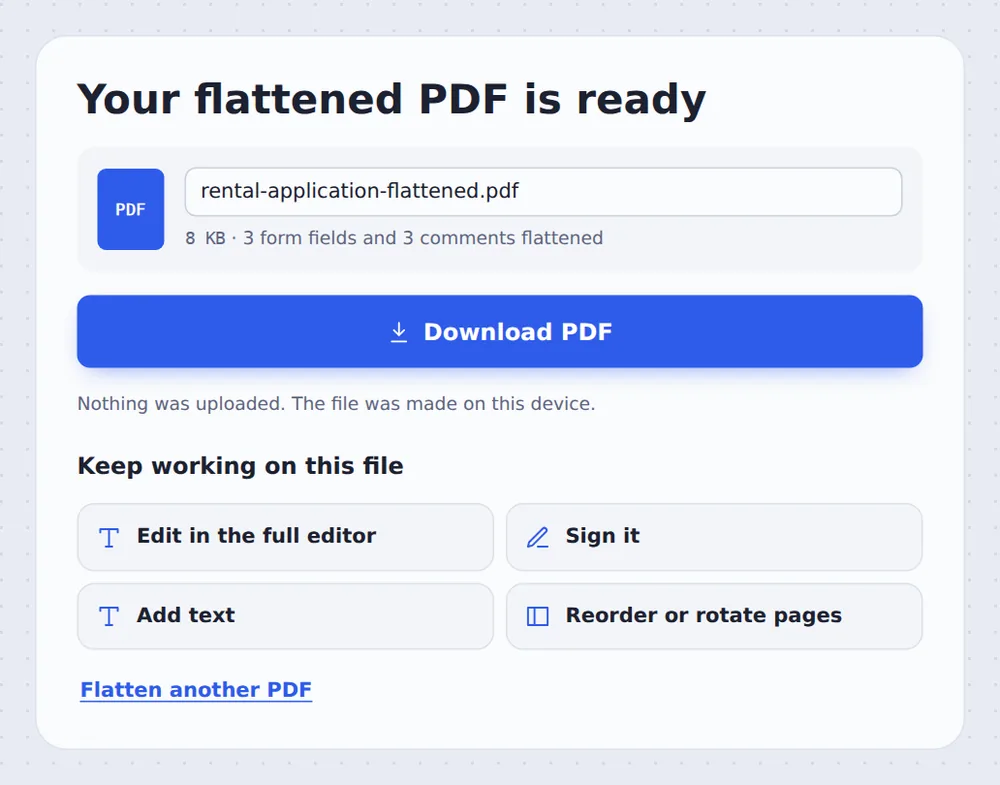
Download the result
Click Download PDF and send it.
What Does Flattening Do?
A fillable form keeps its answers in fields that anyone can click and change, and some apps show those fields differently or not at all. Comments and highlights are separate layers on top of the page that can be moved or deleted.
When you flatten PDF files, those answers and markings are drawn onto the page itself, like ink on paper. They stay exactly where they were, but can no longer be edited, and they print and display the same everywhere.
Links keep working, the text stays sharp and selectable, and your original PDF is not changed, so you can always go back to the fillable version if something needs correcting.
Forms
Typed answers become fixed text.
Comments
Highlights and notes become part of the page.
Fixed
Nobody can change them later.
Answers Fixed on the Page
The flattened form looks the same, but the fields are gone.

Before and After Flattening
What changes in the file, and what stays the same. The pages themselves keep their layout, fonts and pictures.
| Before | After | |
|---|---|---|
| Form answers | In fields anyone can change | Fixed text on the page |
| Comments and highlights | Separate, movable layers | Part of the page |
| In other apps | May look different or go missing | Look the same everywhere |
Private by Design, With No Upload
Filled-in forms are full of personal details: names, addresses, dates of birth and bank numbers. TickPDF does the work inside your own browser tab, so the form never leaves your device and nothing is stored on a server.
There is no account and no copy on our side.
- 0files uploadedYour PDF stays on your device.
- 0copies keptWe never see your pages.
- 0accounts neededOpen the page and start.

Works on iPhone, Android and Computer
- Windows
- Mac
- Linux
- Chromebook
- iPhone
- iPad
- Android
Open this page in your phone's browser, choose the filled-in form and tap the Flatten button. Save the result to Files or send it straight from your phone.
It works the same on Windows, Mac, Linux and Chromebook, with nothing to install.
When People Use This Tool
People flatten PDF files right before they are sent to someone else, uploaded to a portal or printed, when the content is final and should stay exactly as it is.
Submitted forms
Applications that must not change.
Upload portals
Some reject fillable forms.
Printing
Fields that vanish when printed.
Reviewed drafts
Comments kept as a record.
Contracts
Signed and filled agreements.
Marked work
Teacher comments fixed in place.
Pro Tips for Faster Results
- Check the answersFlattened fields cannot be edited again.
- Keep a fillable copyYour original stays fillable.
- Sign firstAdd your signature, then flatten.
- Remove instead?To delete comments, use Remove annotations.
- Protect itAdd a password for extra safety.
- Open it onceCheck the result in your PDF reader.
Related Tools in the Same Editor
They all run in the same private editor.
Remove annotations
Delete comments and highlights.
Sign PDF
Sign the document.
Protect PDF
Add a password.
Compress PDF
Make the file smaller.
Merge PDF
Join files into one document.
PDF Editor
Edit text, sign and annotate.

Flatten PDF: Frequently Asked Questions
Answers to what people ask before they flatten a PDF.
How do I flatten a PDF?
Choose your PDF at the top of this page. Tick Form fields and Comments, highlights and drawings, then click Flatten PDF. They become a fixed part of the pages.
Can I flatten a PDF for free?
Yes. The free plan works on PDFs up to 50 pages and 20 MB, with 3 downloads a day, no account and no watermark. TickPDF Pro removes these limits.
Can I flatten a PDF online?
Yes. The tool runs in your web browser on Windows, Mac, Linux and Chromebook, with nothing to install. Open your PDF at the top of this page to start.
How do I flatten a PDF on my phone?
Open this page in your phone's browser, choose the PDF and tap Flatten PDF. There is no app to install.
Can I flatten a PDF without Adobe Acrobat?
Yes. You do not need Acrobat or any other software. The tool runs in your browser, and the new PDF opens in Acrobat, Preview, Chrome and every other PDF reader.
Is it safe to flatten a PDF online?
Yes. Your PDF is not uploaded. It is opened and processed inside your browser tab and never sent to our servers, so nobody else sees it. Close the tab and nothing is left behind.
Why should I flatten a PDF?
A flattened form cannot be changed by the next person, and it looks the same in every app and printer. Some upload portals also reject fillable forms, but accept flattened ones.
What is the easiest way to flatten a PDF?
Open the filled-in PDF above and click Flatten PDF. Everything you typed stays exactly where it was.
Ready to Flatten Your PDF?
No account, no upload and no watermark: choose your PDF at the top of this page.
Open the toolTickPDF locks forms and comments in place on your own device. Choose your file and flatten PDF forms today.