
Rename PDF Online Free
Rename PDF files: replace scan_0042.pdf with a name you can find later.
- No upload
- Name ideas
- No sign-up
- Title inside too

Rename PDF files that arrived as scan_0042.pdf, document(3).pdf or a long code. The tool suggests names from the document's own heading and title, and can set the title inside the PDF to match, so browsers show it in the tab. Nothing is uploaded.
How to Rename PDF Files
It takes a few seconds.
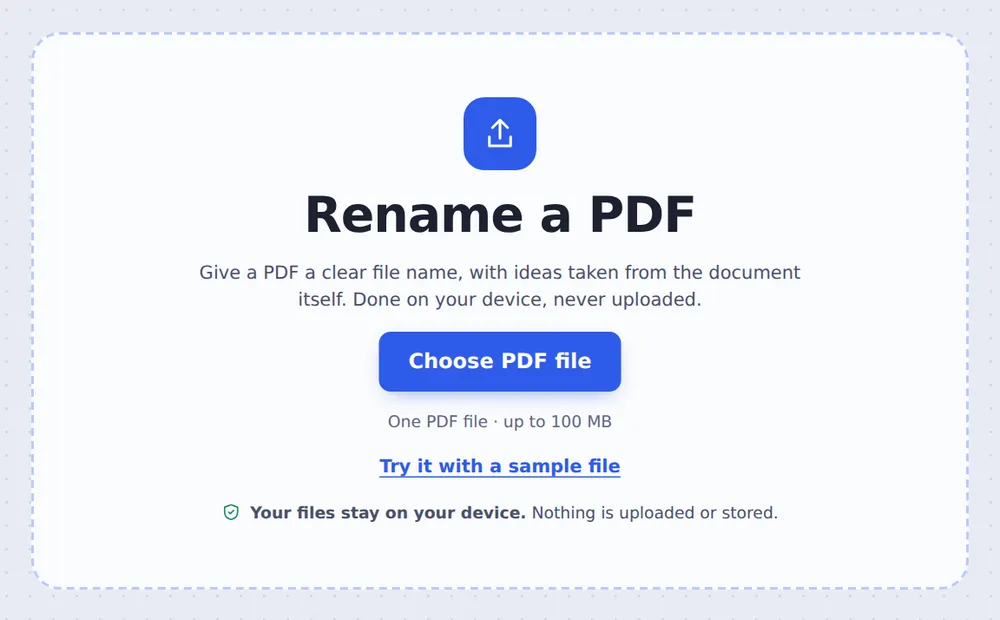
Choose your PDF
Click Choose PDF file or drop the PDF on the tool above.
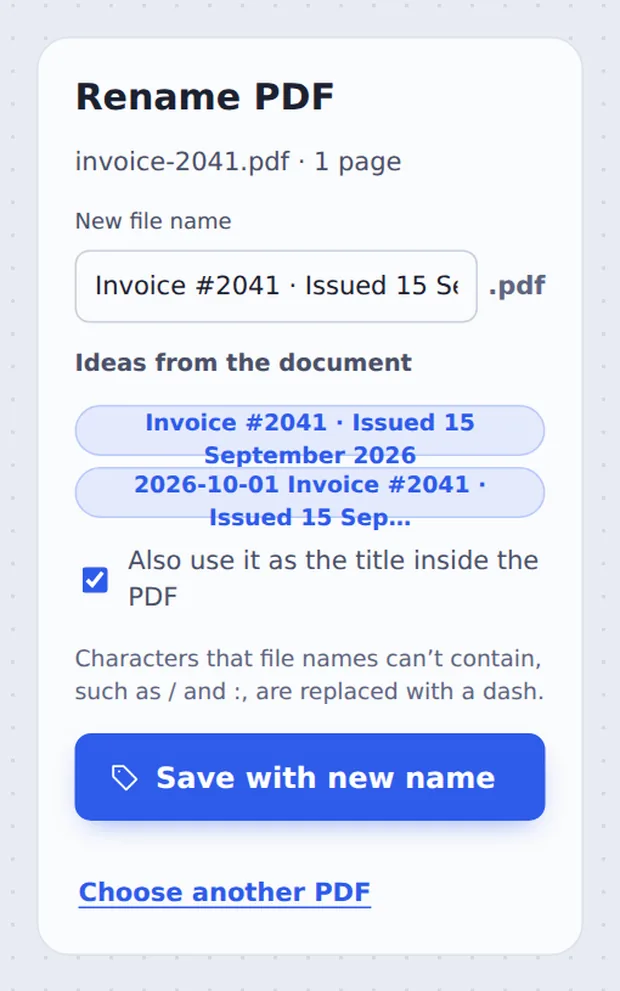
Pick or type a name
Click one of the Ideas from the document, or type your own. Keep Also use it as the title inside the PDF ticked. Click Save with new name.
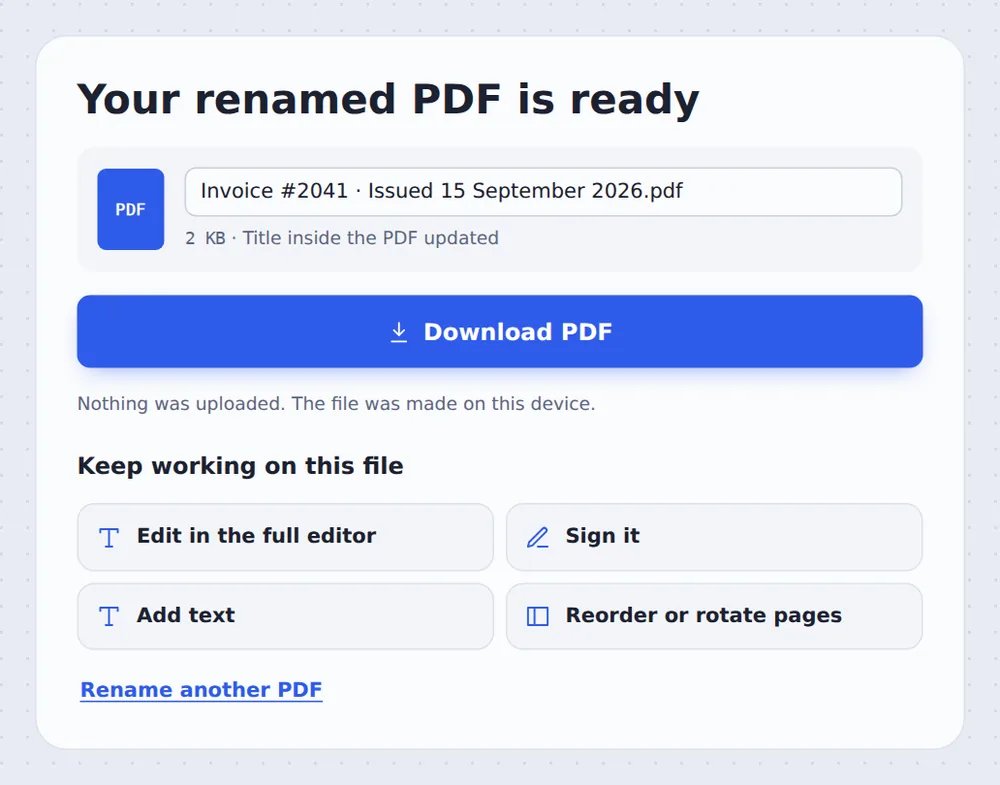
Download it
Click Download PDF. The file is saved with the new name.
File Name and Title
A PDF has two names. The file name is what you see in folders and email attachments. The title is stored inside the file, and browsers and PDF readers show it in the tab and window.
Scanners, banks and web apps often give files meaningless names, and exported PDFs keep titles like Microsoft Word - Document1. When you rename PDF files here, both can be fixed at once.
Characters that file names cannot contain, such as / \ : * ? " < > |, are replaced with a dash so the name works on Windows, Mac and phones.
File name
What you see in folders.
Title
What readers show in the tab.
Ideas
Taken from the page heading.
Names That Are Easy to Find
A simple pattern makes files sort themselves.
| Example | Why it works | |
|---|---|---|
| Date first | 2026-09-15 Invoice 2041 | Sorts by date in any folder |
| Who and what | Brightside - Design agreement | Clear when attached to an email |
| Version | Report Q3 v2 | Shows which is newer |
Rename PDF Files Without Uploading
TickPDF renames your file inside your own browser tab, so it never leaves your device.
There is no account and no copy on our side.
- 0files uploadedYour PDF stays on your device.
- 0copies keptWe never see your pages.
- 0accounts neededOpen the page and start.

Works on iPhone, Android or Computer
- Windows
- Mac
- Linux
- Chromebook
- iPhone
- iPad
- Android
Open this page in your phone's browser, choose the PDF, tap a name idea or type one, and tap Save with new name. Handy when Files does not let you rename a download.
It works the same on Windows, Mac, Linux and Chromebook, with nothing to install.
Files That Need a Better Name
People rename PDF files that come from machines and websites.
Scans
scan_0042.pdf becomes Lease agreement.
Bank downloads
Statements with long codes.
Web forms
document (3).pdf from a portal.
Exports
Titles like Document1.
Client files
Clear names before sending.
Coursework
Names in the format a school asks for.
Tips for Clear File Names
- Date firstYYYY-MM-DD keeps files in order.
- Short and clearWho, what and when is enough.
- Set the titleKeep the title box ticked for websites.
- Clean the detailsRemove PDF metadata deletes old authors.
- Long documentsAdd bookmarks so readers find their way.
- Keep the originalYour original file is not changed.
More PDF Tools
They all run in the same private editor.
Remove PDF metadata
Delete or change hidden details.
Add bookmarks
Make chapters easy to find.
Merge PDF
Join files into one document.
Compress PDF
Make the file smaller.
Split PDF
Cut a PDF wherever you want.
PDF Editor
Edit text, sign and annotate.

Rename PDF: Frequently Asked Questions
Answers to what people ask about naming PDF files.
How do I rename a PDF?
Choose your PDF at the top of this page. Type the new file name, or click one of the ideas taken from the document, then click Save with new name.
Can I rename a PDF for free?
Yes. The free plan works on PDFs up to 50 pages and 20 MB, with 3 downloads a day, no account and no watermark. TickPDF Pro removes these limits.
Can I rename a PDF online?
Yes. The tool runs in your web browser on Windows, Mac, Linux and Chromebook, with nothing to install. Open your PDF at the top of this page to start.
How do I rename a PDF on my phone?
Open this page in your phone's browser, choose the PDF, type the new name and tap Save with new name. There is no app to install.
Can I rename a PDF without Adobe Acrobat?
Yes. You do not need Acrobat or any other software. The tool runs in your browser, and the new PDF opens in Acrobat, Preview, Chrome and every other PDF reader.
Is it safe to rename a PDF online?
Yes. Your PDF is not uploaded. It is opened and processed inside your browser tab and never sent to our servers, so nobody else sees it. Close the tab and nothing is left behind.
What is the title inside a PDF?
Besides the file name, a PDF stores its own title, which browsers show in the tab. Tick Also use it as the title inside the PDF to make both match.
What is the easiest way to rename a PDF?
Open the PDF above, click a suggested name and click Save with new name.
Ready to Rename Your PDF?
No account, no upload and no watermark: choose your PDF at the top of this page.
Open the toolTickPDF renames your file on your own device. Choose your file and rename PDF documents today.