PDF Validator Online Free
A PDF validator that tells you what is wrong with a file, in plain words.
- No upload
- Plain-word results
- No sign-up
- Downloadable report

This free PDF validator checks a file before you send or upload it: is its structure sound, are the fonts embedded, does it claim PDF/A, does it hold scripts that portals reject? Results appear in seconds, in plain words, and the file never leaves your device.
How to Use the PDF Validator
There are no settings: every check runs at once.

Choose your PDF
Click Choose PDF file or drop the PDF on the tool above.
Read the results
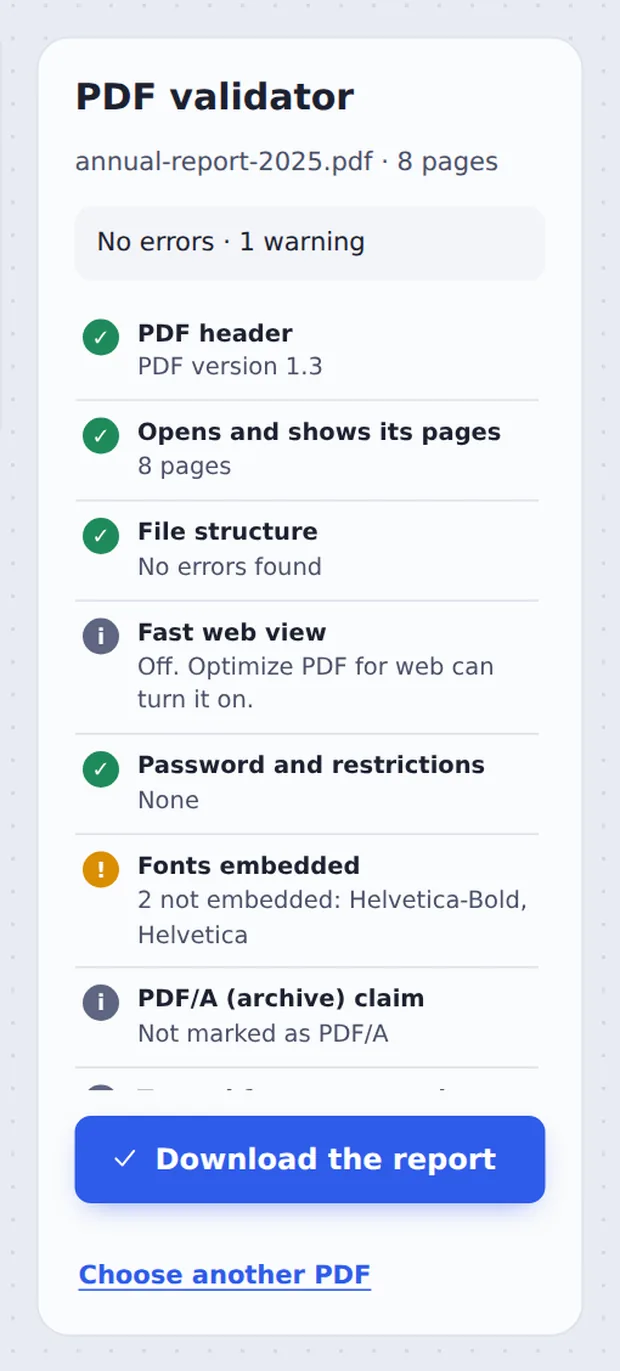
Errors show in red, warnings in orange and useful facts in grey, with a short explanation for each.

Download the report
Click Download the report to save the results as a text file to send to someone.
What Gets Checked
A PDF can look fine on your screen and still be rejected by a court portal, a print shop or a job site. The reason is usually hidden inside the file: a damaged table of contents, a font that is not included, or a script.
This PDF validator reads the file the way those systems do. It checks the internal structure with qpdf, a well-known PDF library, then looks at fonts, the PDF/A claim, accessibility tags, the title and language, scripts, form fields, attachments and page sizes.
Where something can be fixed, the result names the tool that fixes it, such as Repair PDF or Optimize PDF for web.
Structure
Errors that stop files opening.
Fonts
Missing fonts change the look.
Scripts
Often blocked by portals.
What Each Result Means
Red needs fixing; orange is worth a look.
| Why it matters | How to fix it | |
|---|---|---|
| File structure | Damaged files may not open everywhere | Repair PDF |
| Fonts embedded | Text can look different on other computers | Export again with fonts embedded |
| PDF/A claim | Archives and courts may ask for PDF/A | Export as PDF/A from your app |
| Scripts | Some portals reject files with JavaScript | Print to a new PDF |
| Fast web view | Large files show faster online | Optimize PDF for web |
Private by Design, With No Upload
Other checkers upload the file to their servers. This PDF validator runs inside your own browser tab, so you can safely check confidential documents before they go anywhere.
There is no account and no copy on our side.
- 0files uploadedYour PDF stays on your device.
- 0copies keptWe never see your pages.
- 0accounts neededOpen the page and start.

Works on iPhone, Android and Computer
- Windows
- Mac
- Linux
- Chromebook
- iPhone
- iPad
- Android
Open this page in your phone's browser and tap Choose PDF file. The checks appear on the screen in a few seconds.
It works the same on Windows, Mac, Linux and Chromebook, with nothing to install.
When People Use This Tool
People run a PDF validator before a file has to be accepted first time.
Court and government portals
Avoid a rejected filing.
Print shops
Check fonts before printing.
Job applications
Make sure a CV upload works.
Archives
See if a file claims PDF/A.
Damaged files
Find out what is wrong.
Websites
Check fast web view.
Pro Tips for Faster Results
- Red structure errorRun Repair PDF, then check again.
- Fonts not embeddedExport again with “embed fonts” on.
- No titleAdd one with Edit PDF metadata.
- Big fileCompress PDF before uploading.
- RestrictionsSome portals reject locked files.
- Keep the reportSend it with the file if asked.
More PDF Tools
They all run in the same private editor.
Repair PDF
Fix a file that won't open.
Compress PDF
Make the file smaller.
Remove PDF metadata
Delete hidden author details.
Unlock PDF
Remove a password.
Flatten PDF
Lock forms and comments in place.
PDF Editor
Edit text, sign and annotate.

PDF Validator: Frequently Asked Questions
Answers to what people ask before they use a PDF validator.
How do I use a PDF validator?
Choose your PDF at the top of this page. The validator checks it straight away and lists what it found: errors in red, warnings in orange and useful facts in grey. Click Download the report to save the list.
Can I use a PDF validator for free?
Yes. This PDF validator is free to use, with no account and no limit on how many files you check.
Can I use a PDF validator online?
Yes. This one runs in your web browser on Windows, Mac, Linux and Chromebook, with nothing to install. Open your PDF at the top of this page to start.
How do I use a PDF validator on my phone?
Open this page in your phone's browser and tap Choose PDF file. The checks appear on the screen in a few seconds.
Can I validate a PDF without Adobe Acrobat?
Yes. You do not need Acrobat Preflight or any other software. The checks run in your browser.
Is it safe to use a PDF validator online?
Yes. Your PDF is not uploaded. It is opened and processed inside your browser tab and never sent to our servers, so nobody else sees it. Close the tab and nothing is left behind.
Does a PDF validator change my file?
No. The validator only reads your PDF. It never changes or saves it. If it finds a problem, tools such as Repair PDF or Optimize PDF for web can fix it in a new copy.
What is the easiest way to use a PDF validator?
Drop the PDF on the tool above. Everything is checked at once, so there are no settings to choose.
Does this PDF validator check PDF/A?
It reports whether the file says it is PDF/A, and checks several PDF/A basics such as embedded fonts. It does not prove full PDF/A conformance, which needs a dedicated tool such as veraPDF.
Ready to Check Your PDF?
No account, no upload and no watermark: choose your PDF at the top of this page.
Open the toolTickPDF checks files on your own device. Choose your file and run the PDF validator today.