
OCR PDF Online Free
OCR PDF scans so you can search, select and copy their text.
- No upload
- 6 languages
- No sign-up
- Looks like the original

OCR PDF scans to turn pictures of text into real text. The pages look exactly the same, but now you can search them, select words and copy them out, or save all the text as a .txt file. Text recognition runs on your device, so the scan is never uploaded.
How to OCR PDF Scans
The first time, the text reader takes a few seconds to load.

Choose your scanned PDF
Click Choose PDF file or drop the scan on the tool above. Every page is selected.
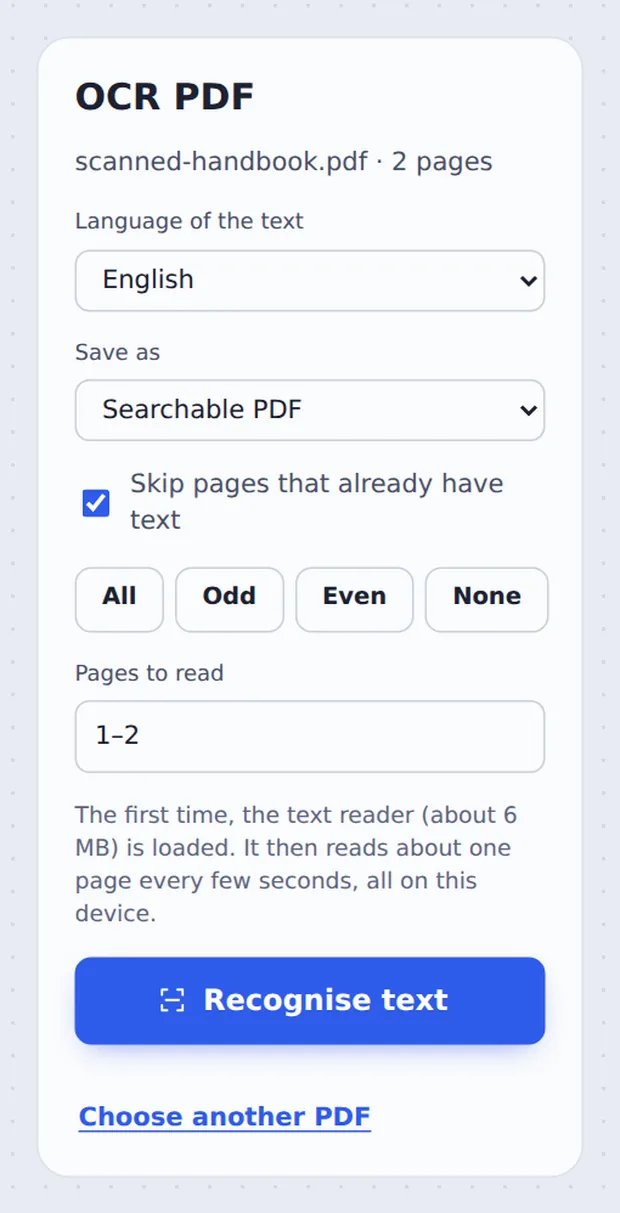
Pick the language
Choose the Language of the text and whether to save a Searchable PDF or a Text file. Then click Recognise text.

Download the result
When every page is read, click Download PDF. The words found are counted on the screen.
What OCR Does to a Scan
A scanned PDF is a photograph of paper. You can read it, but your computer cannot: there is no text inside, so search finds nothing and you cannot copy a sentence.
Optical character recognition, or OCR, looks at the picture and works out the letters. When you OCR PDF pages here, an invisible layer of text is laid exactly over the words on each page. The scan looks the same, but it now behaves like a normal document.
Pages that already contain text are skipped, so a mixed file of typed and scanned pages is handled in one go.
Searchable
Ctrl+F finds words on the scan.
Copy and paste
Select a sentence and copy it.
Plain text
Or save every word as a .txt file.
Find Any Word After You OCR PDF Scans
Here a scanned handbook is searched for handbook: every match is found on the page.

Searchable PDF or Text File?
Both come from the same OCR.
| Searchable PDF | Text file (.txt) | |
|---|---|---|
| Looks like | The original scan | Plain text, no layout |
| Search and select | Yes, in any PDF reader | Yes, in any text editor |
| Best for | Keeping and sharing the document | Pasting into an email or a form |
OCR PDF Files Without Uploading
Most OCR websites upload your scan to their servers to read it. Here the text reader is downloaded to your browser and runs on your own device, so a scanned passport, contract or medical letter never leaves it.
There is no account and no copy on our side.
- 0files uploadedYour PDF stays on your device.
- 0copies keptWe never see your pages.
- 0accounts neededOpen the page and start.

Works on iPhone, Android or Computer
- Windows
- Mac
- Linux
- Chromebook
- iPhone
- iPad
- Android
Open this page in your phone's browser, choose the scan and tap Recognise text. It takes a little longer than on a computer, and nothing is uploaded.
It works the same on Windows, Mac, Linux and Chromebook, with nothing to install.
Why People OCR PDF Files
People OCR PDF scans when a picture of text is not enough.
Contracts
Search a signed copy for a clause.
Receipts and invoices
Copy totals and numbers out.
Study material
Search scanned book chapters.
Letters
Quote a letter in an email.
Archives
Make old paper files searchable.
Forms
Copy details into another form.
Tips to OCR PDF Scans More Accurately
- Straighten firstRun Deskew PDF on crooked scans.
- Scan at 300 dpiSharper scans give better text.
- Pick the languageAccents are read correctly.
- Faint copiesBlack and white PDF can boost contrast.
- Check numbersProofread figures before you rely on them.
- Need to change words?Use Edit scanned PDF.
More PDF Tools
They all run in the same private editor.
Edit scanned PDF
Change words on a scan.
Scan to PDF
Phone photos to a clean PDF.
Deskew PDF
Straighten crooked scans.
PDF to Text
Copy all the text out.
Compress PDF
Make the file smaller.
PDF Editor
Edit text, sign and annotate.

OCR PDF: Frequently Asked Questions
Answers to what people ask before they OCR a PDF.
How do I OCR a PDF?
Choose your scanned PDF at the top of this page, pick the language of the text and click Recognise text. Each page is read on your device, and you download a searchable PDF that looks exactly the same.
Can I convert a scanned PDF to editable text?
Yes. Choose Text file (.txt) under Save as to get all the recognised text in a plain file you can paste anywhere. To change words on the page itself, use Edit scanned PDF.
How do I make a scanned PDF searchable?
Run OCR on it here. An invisible layer of text is laid exactly over the words on each page, so you can search, select and copy them in any PDF reader, while the page still looks like the original scan.
Can I OCR a PDF for free?
Yes. The free plan works on PDFs up to 50 pages and 20 MB, with 3 downloads a day, no account and no watermark. TickPDF Pro removes these limits.
How accurate is PDF OCR?
On clear, printed scans at 200 to 300 dpi, OCR gets nearly every word right. Accuracy drops with blurry photos, very small print, unusual fonts and handwriting. Straighten crooked pages with Deskew PDF first for the best result.
Can OCR recognize text from scanned documents?
Yes, that is what it is for: scans, photos of pages and faxes. It reads printed text in English, Spanish, French, German, Portuguese and Italian. Handwriting is usually not recognised.
Can I OCR a PDF on my phone?
Yes. Open this page in your phone's browser, tap Choose PDF file and tap Recognise text. It takes a little longer than on a computer, and nothing is uploaded.
How do I edit a scanned PDF?
Use Edit scanned PDF: it runs OCR first and then opens the pages in the editor, where you click any line of text to change it. You can also download the searchable PDF here and open it in the editor.
Ready to OCR Your PDF?
No account, no upload and no watermark: choose your PDF at the top of this page.
Open the toolTickPDF reads scans on your own device. Choose your file and OCR PDF pages today.