
Compress PDF Online Free – Make It Smaller
Compress PDF files in seconds: make big scans small enough to email, right in your browser.
- No upload
- No watermark
- No sign-up
- Text stays sharp

Compress PDF files that are too big to email or upload. Scanned pages and photos are made smaller, while text and drawings stay exactly as sharp as before. You see the new size before you download, and your file is never uploaded.
How to Compress PDF Files
A 10 MB scan usually becomes a few hundred KB.

Choose your PDF
Click Choose PDF file or drop the PDF on the tool above. The panel shows how big it is now.

Pick a level
Recommended suits almost everything. Choose Strong for the smallest file, or Light to keep the most picture detail. Then click Compress PDF.
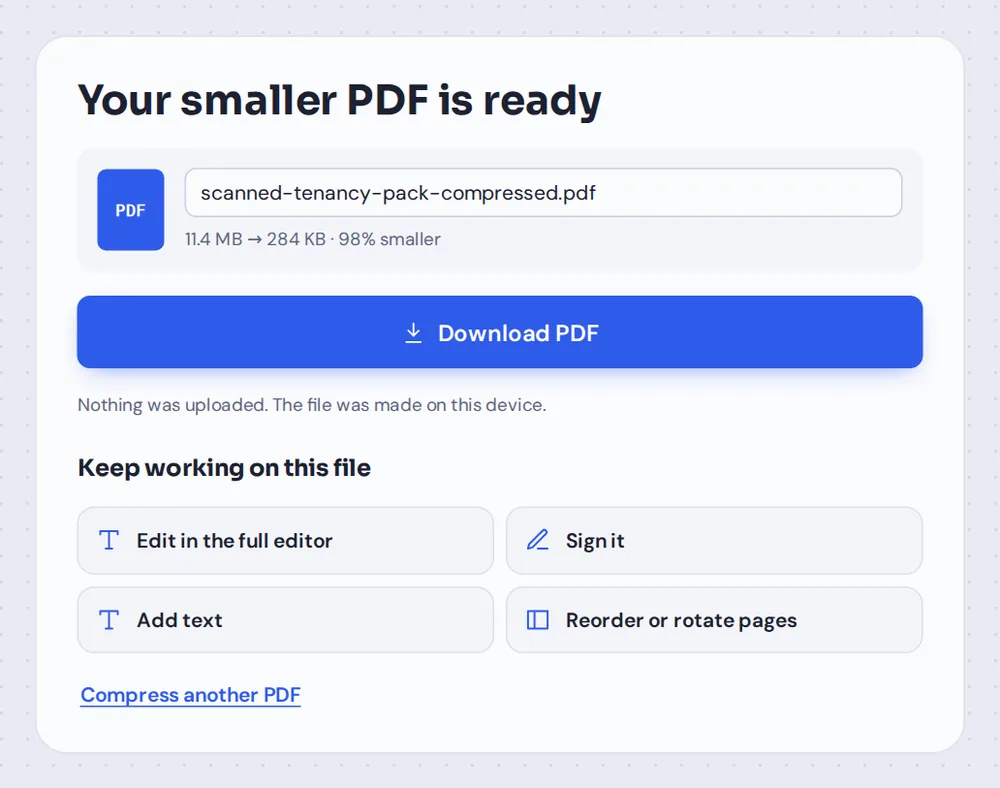
Check the new size and download
The finished screen shows the old and new size, such as 11.4 MB → 284 KB. Click Download PDF, or keep working on the file.
Why Are Some PDFs So Big?
Most of the weight in a PDF is pictures. A scanner or phone app saves each page as a large, detailed photo, often three or four times the detail a screen or printer needs. Ten scanned pages can add up to 20 MB or more.
When you compress PDF files here, each picture is redrawn at a sensible size and saved again in an efficient way. Text, lines and vector drawings are not pictures, so they are copied exactly as they are and stay perfectly sharp.
A PDF that is mostly text is already small. If a file cannot be made meaningfully smaller, the tool tells you and keeps it as it was.
Scans and photos
This is where the big savings come from, often 80–95%.
Text and drawings
Left exactly as they are, so they stay sharp.
Already small PDFs
Kept as they are, with a note that says so.
Which Level Should You Choose to Compress PDF Files?
What each level does to the pictures inside your PDF.
| Pictures | Best for | |
|---|---|---|
| Recommended | Clear on screen and in print, much smaller | Email, upload forms and everyday sharing |
| Strong | Softer, smallest file | Strict size limits, such as 1 or 2 MB forms |
| Light | Most detail kept, a little smaller | Photos and plans you may zoom in on |
How the PDF Compressor Works
Simple on the outside, careful on the inside.
Pictures
Where the space is saved.
- Resized sensibly
Oversized scans and photos are brought down to a size that still looks clear.
- Saved efficiently
Pictures are stored again with modern compression.
- Only when it helps
If a picture would not get smaller, the original is kept.
Everything else
Left alone on purpose.
- Text
Stays real, sharp and searchable.
- Links and form fields
Keep working as before.
- Page order and size
Exactly the same as the original.
Private
Made on your device.
- No upload
The PDF is compressed inside your browser.
- No watermark
Nothing is added to your pages.
- Your original
The file you opened is not changed.
Keep working
The smaller PDF opens in the editor.
- Sign it
Add your signature before you send it.
- Add text
Fill in a missing detail.
- Reorder pages
Move, rotate or delete pages.
Compress PDF Files Without Uploading Them
Most online tools upload your PDF to a server to compress it. TickPDF does the work inside your own browser tab, so bank statements, IDs and contracts never leave your device.
Big files are also quicker this way: there is no upload to wait for, only the time your own computer or phone needs.
- 0files uploadedYour PDF stays on your device.
- 0copies keptWe never see your pages.
- 0accounts neededOpen the page and start.

Compress PDF on iPhone, Android or Computer
- Windows
- Mac
- Linux
- Chromebook
- iPhone
- iPad
- Android
Open this page in your phone's browser, choose the PDF from your files and tap Compress PDF. It is handy when a form on your phone rejects a scan for being too big.
It works the same on Windows, Mac, Linux and Chromebook, with nothing to install.
When People Make a PDF Smaller
Whenever a file is too big for where it needs to go.
Email attachments
Get under the 20–25 MB limit of most email services.
Upload forms
Government, university and job portals with 2–5 MB limits.
Rental and loan papers
Scanned payslips, IDs and statements.
Assignments
Scanned homework for learning platforms.
Invoices and receipts
Photos of receipts for expense claims.
Storage
Free up space in your cloud drive or phone.
Tips to Compress PDF Files Even Smaller
- Scan at 150–200 dpiHigher settings make huge files without looking better.
- Remove extra pagesDelete blank or unneeded pages before you compress.
- Try Strong for strict limitsForms with a 1 or 2 MB limit usually need Strong.
- Split very long filesSome portals take several small files better than one big one.
- Check before sendingOpen the compressed file and zoom in on any small print.
- Keep the originalYour original PDF is not changed, so keep it as a backup.
More PDF Tools
Like the tool to compress PDF files, they all run in the same private editor.
Split PDF
Cut a big PDF into smaller files.
Delete PDF pages
Remove pages you do not need.
Merge PDF
Join files into one document.
JPG to PDF
Turn photos into a PDF.
Protect PDF
Add a password before you send it.
Sign PDF
Sign the smaller file.

Compress PDF: Frequently Asked Questions
Answers to what people ask before they make a PDF smaller.
How do I compress a PDF file?
Click Choose PDF file or drop your PDF on the tool at the top of this page. Pick Recommended, Strong or Light and click Compress PDF. The new size is shown before you download.
Can I compress a PDF for free?
Yes. The free plan works on PDFs up to 50 pages and 20 MB, with 3 downloads a day, no account and no watermark. TickPDF Pro removes these limits.
How do I reduce PDF file size without losing quality?
Choose Light or Recommended. Only the pictures and scans inside the PDF are made smaller; text, lines and drawings are copied exactly as they were, so they stay sharp at any zoom.
How do I compress a PDF to a specific size?
There is no exact size setting, but you choose how hard to squeeze. Start with Recommended; if the file is still too big for the upload form or email, go back and pick Strong. The finished screen shows the new size before you download.
Can I compress a PDF on my phone?
Yes. Open this page in your phone's browser, choose the PDF from your files and tap Compress PDF. There is no app to install.
Why is my PDF file so large?
Usually because of pictures. Scanned pages and photos are saved at very high resolution, often much more than a screen or printer needs. A few scanned pages can easily reach 10 MB or more.
Does compressing a PDF reduce quality?
Only the pictures change, and you choose how much. Recommended keeps them clear on screen and in print, Strong makes them softer to save the most space, and Light keeps the most detail. Text is never changed.
How do I compress a PDF for email?
Most email services accept attachments up to about 20–25 MB. Compress the PDF with Recommended, check the new size on the finished screen, and use Strong if it is still too large.
Ready to Compress PDF Files?
No account, no upload and no watermark: choose your PDF at the top of this page.
Open the toolTickPDF makes big scans small enough to send, on your own device. Choose your file and compress PDF files today.