
Edit PDF Metadata Online Free
Edit PDF metadata in seconds: give your file the right title, author and keywords.
- No upload
- Pre-filled
- No sign-up
- Pages unchanged

Edit PDF metadata so your document shows a proper title in browser tabs, search results and file properties. The details already in the file are filled in, so you only change what is wrong. Your PDF is never uploaded.
How to Edit PDF Metadata
The current details appear as soon as the file opens.

Choose your PDF
Click Choose PDF file or drop the PDF on the tool above.
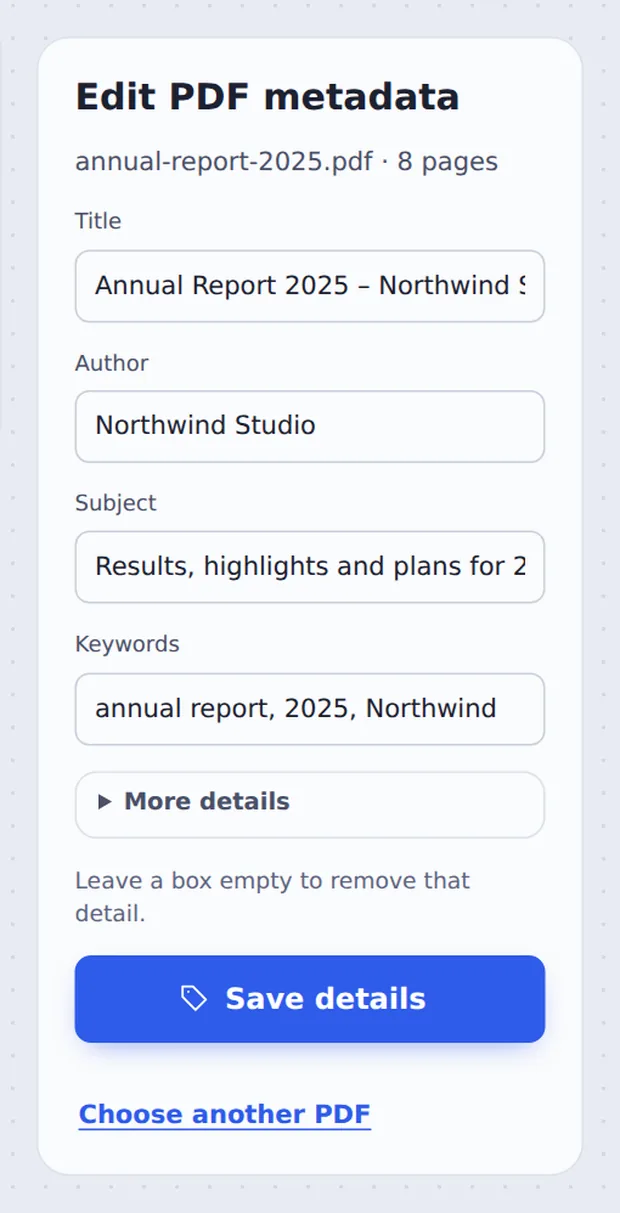
Change the details
Type a new Title, Author, Subject or Keywords. Open More details for the software and dates. Leave a box empty to remove it.

Save and download
Click Save details and download the updated PDF.
What Is PDF Metadata?
Every PDF can carry a small set of details about itself: a title, the author, a subject, keywords, the app that made it and the dates it was created and changed. You see them under File → Properties in any PDF reader.
They matter more than most people think. Browsers show the title in the tab instead of the file name, search engines use it for PDFs on websites, and document systems sort files by author and date.
When you edit PDF metadata here, only these details change. Text, pictures, links and form fields stay exactly as they were.
Title
Shown in browser tabs and search results.
Author
Your name or your company.
Keywords
Words that help people and systems find the file.
Every Field You Can Change
All of them are optional.
| What it is | Example | |
|---|---|---|
| Title | The name of the document | Annual Report 2025 |
| Author | Who wrote it | Northwind Studio |
| Subject | A short description | Results and plans for 2026 |
| Keywords | Search words, separated by commas | annual report, 2025 |
| Created with / PDF made by | The apps used | Microsoft Word |
| Created / Last changed | The dates stored in the file | 2026-09-18 |
Edit PDF Metadata Without Uploading
TickPDF changes the details inside your own browser tab, so the document never leaves your device. There is no account and no copy on our side.
Close the tab and nothing is left behind.
- 0files uploadedYour PDF stays on your device.
- 0copies keptWe never see your file.
- 0accounts neededOpen the page and start.

Edit PDF Metadata on iPhone, Android or Computer
- Windows
- Mac
- Linux
- Chromebook
- iPhone
- iPad
- Android
Open this page in your phone's browser, choose the PDF, change the details and tap Save details.
It works the same on Windows, Mac, Linux and Chromebook, with nothing to install.
When People Change PDF Details
Small details, big difference.
PDFs on websites
A clear title in the tab and in Google.
Client documents
Your company as the author, not an employee login.
Exported files
Replace titles like "Microsoft Word - Document1".
Theses and papers
Title and author as the university asks.
Document libraries
Keywords that make files easy to find.
Dates
Fix wrong created or changed dates.
Pro Tips for Faster Results
- Write a real titleUse words people would search for, not a file name.
- Use a company authorIt looks more professional than a personal login name.
- Keep keywords shortThree to six words or phrases, separated by commas.
- Remove what is privateEmpty a box to delete that detail completely.
- Clean before sharingUse Remove PDF Metadata to wipe every detail at once.
- Keep the originalYour original PDF is not changed.
More PDF Tools
Like the tool to edit PDF metadata, they all run in the same private editor.
Remove PDF Metadata
Delete every hidden detail.
Optimize PDF for web
Make it open fast online.
Compress PDF
Make the file smaller.
Protect PDF
Add a password.
Edit PDF Text
Change words on the pages.
Sign PDF
Sign the document.

Edit PDF Metadata: Frequently Asked Questions
Answers to what people ask before they change PDF details.
How do I edit PDF metadata?
Choose your PDF at the top of this page. The title, author, subject and keywords already in the file are filled in for you. Change them, then click Save details and download the updated PDF.
Can I edit PDF metadata for free?
Yes. The free plan works on PDFs up to 50 pages and 20 MB, with 3 downloads a day, no account and no watermark. TickPDF Pro removes these limits.
Can I edit PDF metadata online?
Yes. The tool runs in your web browser on Windows, Mac, Linux and Chromebook, with nothing to install. Open your PDF at the top of this page to start.
How do I edit PDF metadata on my phone?
Open this page in your phone's browser, tap Choose PDF file, change the details and tap Save details. There is no app to install.
Can I edit PDF metadata without Adobe Acrobat?
Yes. You do not need Acrobat or any other software. The new details show in the Properties of Acrobat, Preview, Chrome and every other PDF reader.
Is it safe to edit PDF metadata online?
Yes. Your PDF is not uploaded. It is opened and processed inside your browser tab and never sent to our servers, so nobody else sees it. Close the tab and nothing is left behind.
How do I edit PDF metadata without losing quality?
Only the details stored in the file change. The pages are copied exactly as they are, so text, pictures and links are untouched.
What is the easiest way to edit PDF metadata?
Open the PDF above, type a clear title and your name as the author, and click Save details. The title is what browsers show in the tab when the PDF is opened.
Ready to Edit PDF Metadata?
No account, no upload and no watermark: choose your PDF at the top of this page.
Open the toolTickPDF changes the details on your own device. Choose your file and edit PDF metadata today.